

 9.3 / 10 - 4518
reviews
9.3 / 10 - 4518
reviews
How do you protect your recovery seed phrase?
When you set up a hardware wallet, you are shown a list of words. This list is called your recovery seed phrase. It usually has 12 or 24 words, but seeds of 18 or 20 words also exist. With your recovery seed phrase you can always get back to your crypto, even if your hardware wallet breaks or gets lost. The reverse is also true: anyone who has your recovery seed phrase can steal your crypto.
Below you will find the ground rules, how to check that your recovery seed phrase is correct and why we recommend recording it in metal.
Ground rules for your recovery seed phrase
- Never enter it on a website, app, phone or computer: you only ever enter your recovery seed phrase on your hardware wallet itself. Nobody will ever ask you for it, not BTC Direct, not Ledger and not Trezor. If someone does ask for your recovery seed phrase, it is a scam. Also read how to recognise crypto scams.
- Trust only your hardware wallet: you always see your recovery seed phrase on your hardware wallet during setup. It is never known in advance and never included in the box. You also set the PIN yourself; it is never preset.
- Write it down with pen and paper: hardware wallets often come with cards to write your recovery seed phrase on. Number the words, because the order is just as important as the words themselves.
- Never store it digitally: do not take a photo, screenshot or digital file of your recovery seed phrase, and do not save it in a password manager or in the cloud.
- Mind your surroundings: make sure there are no cameras, microphones or onlookers nearby when you write down your recovery seed phrase.
- Choose a good hiding place: do not keep your recovery seed phrase with your hardware wallet, but in a dry, safe place that only you know. Also think about who should be able to access it if something happens to you.
- Record it in metal: once you have checked that your recovery seed phrase is correct (see below), transfer it to a metal backup such as the SOLIDHODL. This protects it against fire, water and wear.
How do you know your recovery seed phrase is correct?
You want to be 100% sure that your recovery seed phrase is correct. You only notice a mistake when you need to restore your wallet, and by then it is too late.
Use your wallet’s check function
Many hardware wallets, such as Ledger and Trezor, can check for you whether your backup is correct. You enter your recovery seed phrase on the hardware wallet, which tells you whether it matches the wallet. This is the easiest and safest way.
No check function? Test the recovery yourself
Does your wallet not have this function, or do you want to go through the full recovery once? Do this before you put larger amounts on your wallet.
- Send a small amount to your wallet: use a receiving address from your hardware wallet and make a note of it.
- Reset your hardware wallet: how this works differs per wallet. With Trezor you can do it in Trezor Suite. With Ledger you enter the wrong PIN three times, after which the device wipes itself. For other wallets, check the manual.
- Restore your wallet: choose “restore” or “recover” and enter your recovery seed phrase on your hardware wallet.
- Check the result: if you see the same receiving address and your test amount again, you know for sure that your recovery seed phrase is correct.
If you find a mistake now, you can still correct it in time. If you skip this step and your recovery seed phrase contains a mistake, you may lose your crypto for good in the future. If everything is correct, you can put larger amounts on your hardware wallet with peace of mind.
Why you store your recovery seed phrase in metal
Paper is a good first step, but it is vulnerable. That is why we recommend recording your recovery seed phrase in metal, for example with a SOLIDHODL.
- Fire resistant: paper burns quickly, while stainless steel only melts at around 1,370 °C. As a rule, a metal backup therefore survives a house fire in which a paper backup is lost. Titanium melts at an even higher temperature; in Why SOLIDHODL? you can read why we still choose stainless steel.
- Water resistant: moisture and water cause mould, smudged ink and illegible text on paper. It does not take a flood: a knocked over glass is enough. Metal is not affected. Some types of stainless steel can rust after a long time under water, but the steel of the SOLIDHODL does not.
- Strong and durable: metal cannot tear, crumple or decay. A metal backup lasts for decades.
- Stays legible: ink fades over time, especially with light and heat. Characters stamped or punched into metal stay sharp and legible.
- Harder to lose: you will not throw away a metal plate by accident, and nobody else will mistake it for scrap paper either. A metal backup also makes you choose a good place to keep it.
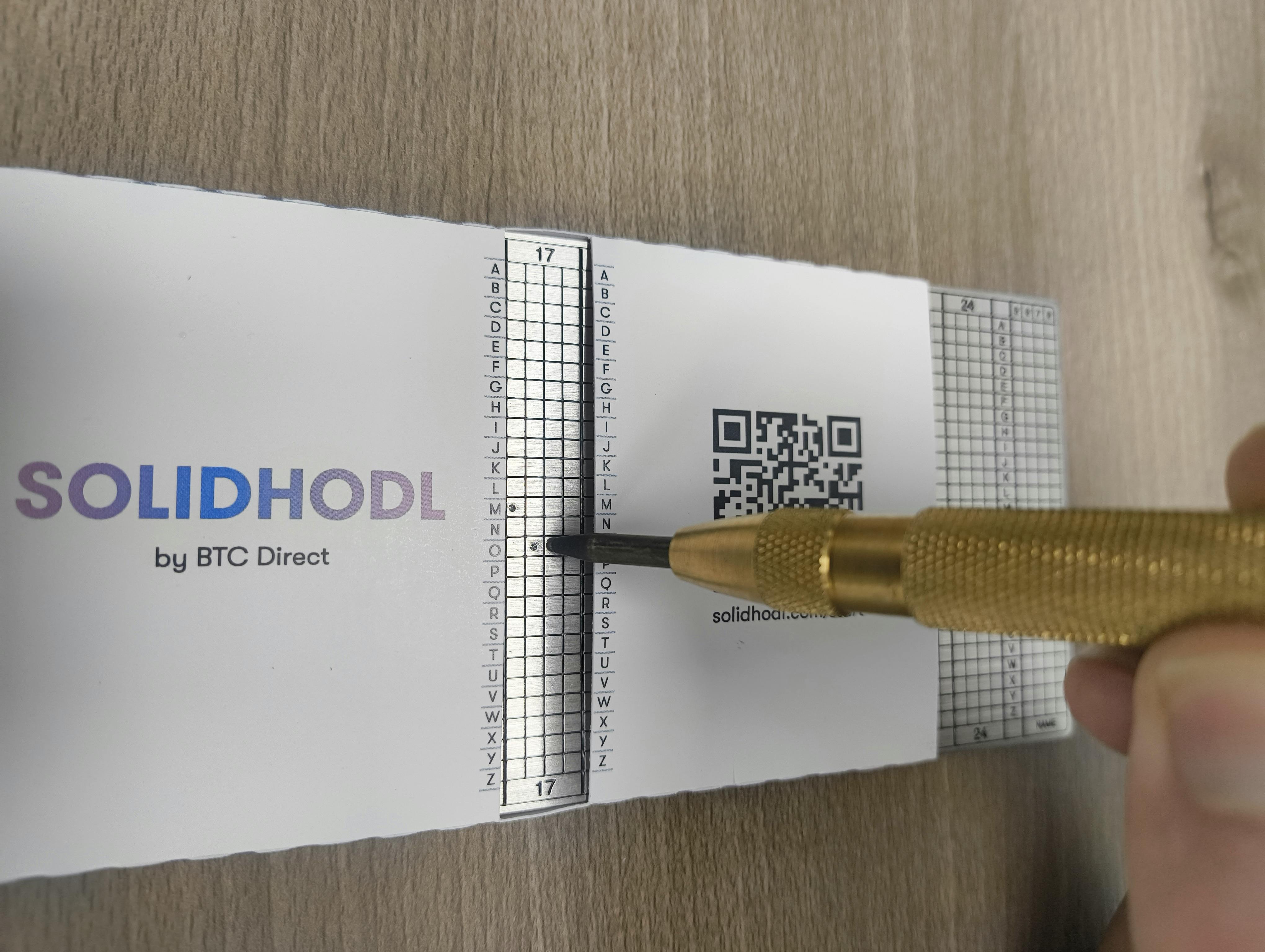
The photo shows the SOLIDHODL in use: the word “MOON” is being recorded in column 17. The Sleeve lets you work one word and one column at a time, which keeps the risk of mistakes low.
Frequently asked questions
What if someone has seen my recovery seed phrase?
Assume your wallet is no longer safe. Set up a new wallet with a new recovery seed phrase, for example on a second hardware wallet, and move all your crypto there as quickly as possible.
I have lost my recovery seed phrase, but my wallet still works. What now?
You still have access, but no backup. Set up a new wallet with a new recovery seed phrase, write it down carefully and move your crypto there. If you have lost your recovery seed phrase and your wallet is also broken or gone, your crypto can no longer be recovered.
Can I store my recovery seed phrase in a password manager or the cloud?
No. Anything stored digitally can be hacked or leaked. Only keep your recovery seed phrase on paper and in metal.
Want to learn more about crypto security?
We believe in sharing knowledge, so you can store your bitcoin and crypto safely.
- Read here: How to recognise crypto scams
- Read here: Getting started with your hardware wallet
- Read here: Why SOLIDHODL is the best backup
Do you have any questions? Contact us.
Recommended hardware wallets
BTC Direct is integrated with all of these hardware wallets, so you can buy and sell from the wallet apps without needing an exchange.

Ledger
Secure your crypto with Ledger and buy and sell from the Ledger Wallet app via BTC Direct.

Trezor
Secure your crypto with Trezor and buy and sell from Trezor Suite via BTC Direct.

BitBox
Secure your crypto with BitBox and buy and sell from the BitBox app via BTC Direct.

NGRAVE
Secure your crypto with NGRAVE and buy and sell from NGRAVE LIQUID via BTC Direct.

 WhatsApp
 Email
Email